
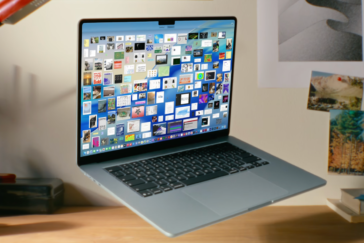
Apple’s new MacBook Air with the M5 chip looks basically the same. But it fixes one of the most annoying “Apple being Apple” problems: the base storage isn’t a joke anymore.
The entry-level MacBook Air M5 now starts with 512GB of storage instead of 256GB. In France, Apple’s launch price is €1,199 for a 16GB RAM / 512GB SSD model. Converted, that’s roughly $1,299 in U.S. money (give or take taxes, exchange rates, and Apple’s usual pricing voodoo). Preorders open March 4, 2026, with availability on March 11, in 13-inch and 15-inch sizes.
And yeah, the real story isn’t the silhouette. It’s whether this Air is finally “properly equipped” the day you buy it—or whether you’ll still be paying the Apple tax to avoid regrets six months later.
512GB by default: Apple loosens up—then keeps a hand in your wallet
Jumping from 256GB to 512GB at the starting line matters. A laptop people keep for 4 to 6 years shouldn’t feel cramped after a couple iPhone photo dumps, a few video projects, and some offline files (classes, travel downloads, RAW photos). Yet that’s exactly what 256GB has been doing to people.
Apple’s base configuration is now 16GB/512GB at €1,199 in France. That’s Apple catching up to what buyers already expect in 2026, especially when plenty of Windows ultrabooks in the roughly $1,100–$1,400 range ship with 512GB—and sometimes 1TB when retailers start cutting prices. This isn’t generosity. It’s Apple cleaning up an optics problem.
Apple also claims a faster SSD, but doesn’t attach numbers. In real life, SSD speed shows up when you’re opening big photo/video folders and when macOS starts “swapping” (using storage as extra memory). With 16GB of RAM standard, swapping should happen less than it did on the old 8GB base models—but it’s not gone.
If you’re the “I store everything locally” type, Apple now offers up to 4TB of storage as an option (up from 2TB). The catch is the same as always: once you start maxing out an Air, the price climbs fast enough that you’re wandering into MacBook Pro territory—where the machine actually makes sense for heavier work.
M5 and “Apple Intelligence”: more AI on the laptop, less in the cloud
The 2026 Air moves to Apple’s new M5 chip, with a faster CPU and a new-generation GPU. Apple’s big pitch is AI performance: it says each core includes a Neural Accelerator for machine-learning tasks like recognition, sorting, analysis, and generation.
The practical upside is simple: more AI work done on-device instead of shipped off to the cloud. When features run locally, your data is more likely to stay on your machine, and you’re not stuck waiting on a solid connection. For note-taking, document organization, and certain edits, that kind of responsiveness is the difference between “neat demo” and “I actually use this.”
Apple pairs the Air with macOS Tahoe and its Apple Intelligence features. But don’t get starry-eyed: not every AI feature is guaranteed to be 100% local forever. If privacy is your reason for buying, you’ll still need to check—feature by feature—what stays on your laptop and what gets sent out.
Wi‑Fi 7 and Bluetooth 6: the wireless finally matches 2026 reality
Connectivity gets a real update: Wi‑Fi 7 (replacing Wi‑Fi 6E) and Bluetooth 6 (replacing 5.3). Wi‑Fi 7 can mean higher speeds and lower latency—if you’ve got a compatible router. In 2026, those routers are showing up more, especially in higher-end gear, but plenty of people won’t feel the benefit on day one.
Bluetooth 6 is for the people living on earbuds, keyboards, and mice. The promise is steadier connections and fewer annoying hiccups in crowded environments—offices, trains, airports. As always, you’ll need compatible accessories to get the full effect, but at this price, nobody wants to buy a brand-new laptop that’s already a generation behind.
Apple says this is powered by a new wireless chip called N1. Apple loves controlling the stack for battery life and stability. The downside is also familiar: Apple accessories tend to behave perfectly, and some third-party gear can be a little more… temperamental. Not catastrophic. Just not what you want to hear when you’re paying north of a grand.
Same look, same fanless trade-offs: this Air is for people who skipped M4
The chassis doesn’t change: thin aluminum body, Liquid Retina display, and the same fanless design. Silence is great. But fanless also means the laptop can throttle performance on long, heavy tasks—video exports, sustained compute—so it doesn’t cook itself. For office work and light creative stuff, it’s a sweet spot. For serious editing marathons, buy the Pro and stop pretending.
You also get a 12MP camera with Center Stage (auto-framing for video calls), speakers with Spatial Audio, and support for two external displays. That last part matters more than Apple likes to admit: a lot of people buy laptops to dock at a desk, and multi-monitor support is the difference between “productive” and “why did I do this to myself?”
Apple claims up to 18 hours of battery life. Real-world mileage depends on brightness, browser tabs, and whether you’re living in apps like Teams, Chrome, or editing software. But the Air’s reputation for lasting a full day without panic-charging is still one of its best arguments—something plenty of Windows ultrabooks still struggle to match consistently.
One more tweak: Apple now includes a 40W charger (with support up to 60W), up from the older 30W/35W range. It’s not a headline-grabbing fast-charge story, but it’s the kind of small improvement you feel when you’re trying to grab a few hours of battery during a coffee break.
Should you dump an M4 MacBook Air for this? Probably not. The design, screen, and battery claims sound awfully familiar. But if you’re coming from an older Air—or a PC—and you want 16GB RAM and 512GB without paying extra just to make the laptop feel normal, this is the version Apple should’ve been selling all along.